• Home
  • Modules
    • Sales
    • Purchasing
    • Inventory
    • Finance
    • Contacts
    • Assets
    • Data
    • Management
  • Plus Option
    • Repair Order
    • Rental Order
  • News
  • Pricing
  • Contact Us
  • About Us
Download Manual

Sales

Maintains a complete customer information, including alternate ship-to-addresses
Maintains customer current balance, open credit, last payment, last invoice number
Keeps track of customers open credits and deposits
Allows three (3) different classification of customer: industry, state and class
Displays screen for notes per customer
Provides open statement formats on customers with optional user define aging information
Prints invoices, credit memos, statement and all other documents on plain paper
Tracks sales by customer, salesman and technician
New customers can be added "on the fly" during transaction entry
Maintains individual Account Receivable account per customer
Maintains Foreign Currency per customer
Alerts you when a customer exceeds the credit limit
Customer cannot be deleted if it has an open transaction or open balance
Allows beginning and ending notes on invoices and sales order
Allows discount on a line-by-line basis on invoices, and sales order
Accepts payments and additional discount at the time of invoicing
Allows five types of payments: manual, automatic, semiautomatic, by invoice and others
Allows previously entered cash posting to be voided
Allows up to 99 bank accounts to receive payments
Open credits can be applied to invoices
Allows previously applied credits to be voided
Allows you to write off bad debt and to refund invoices
Allows you to delete sales quote not approved by "N" periods off the system
Maintains recurrent billing to customers
Convert sales quotes to sales orders and convert sales orders to invoices instantly
Allows prepaid orders from customers
Allows differed payments from customers
Allows partial shipment of sales order
Recommends substitution for out of stock items
Post to Inventory "Required" & "To Order" in Sales Order and Invoicing when out of stock items
Limits invoicing on Available stock of items
Limits sales order modification on shipped orders
Limits invoices modification on paid invoices

Customer

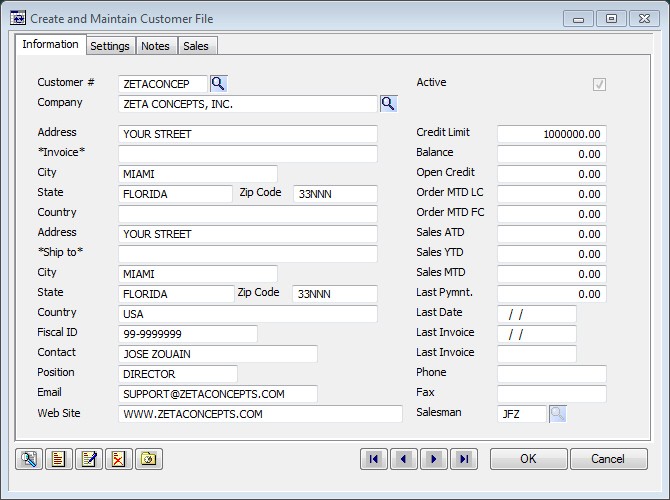
The main customer maintenance function is where you have all the characteristics for each customer that you will keep track in your system. To make it easier to work with the high number of fields needed to store the data, the window has three pages: The Information page contains the most relevant data for a customer. Some data fields are informative only while others are editable. The Settings page contains supplemental information about your customer. The Notes page, you can enter any text that relates to your customer.

Invoicing

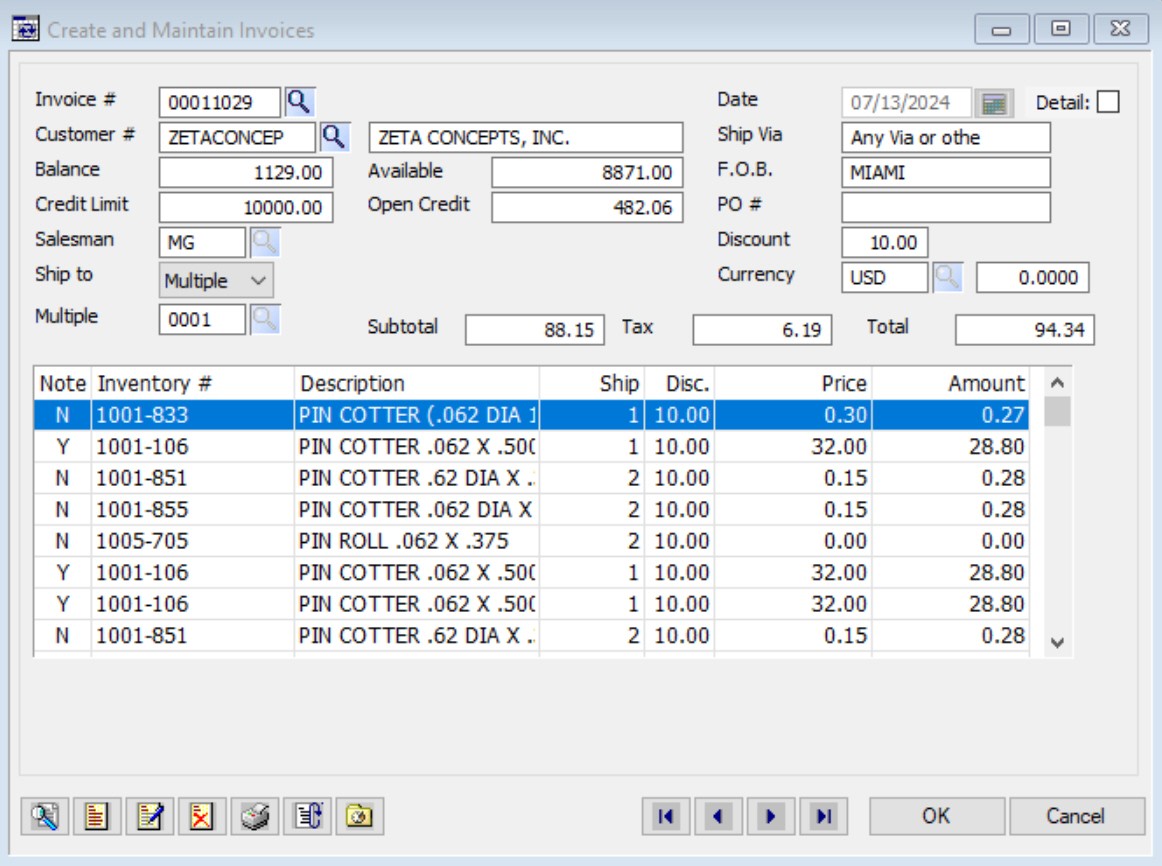
RInvoicing is the process of sending a bill to a customer for goods or service provided. The Invoice Header section holds your customer’s data. At the bottom you will find a set of fields that will show the running totals for the invoice. The Detail section contains a list of items charged to this invoice, which is under the invoice header. There must be at least, one merchandise item sold to the customer. The Payment and Notes screen lets you change the payment type for the invoice and where you can add a beginning and ending notes.
Sales Order

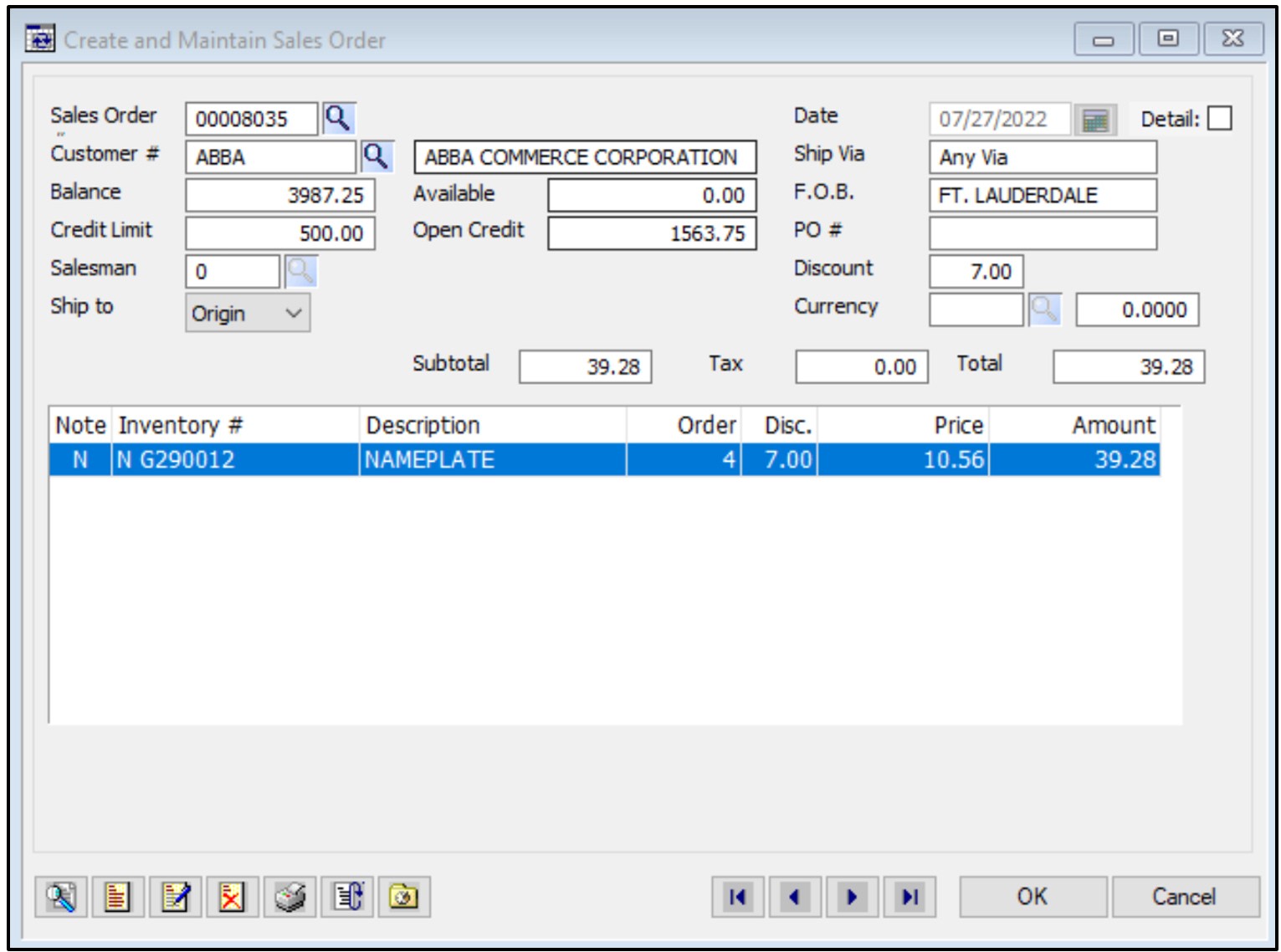
Sales Orders is a document that confirms a sales between a buyer and a seller. The Sales Order Header page holds your customer’s data, At the bottom you will find a set of fields that will show the running totals for the order. The Detail section contains a list of the items used at this sales order, which is under the sales order header. The Payment and Notes screen lets you change the payment type for the order and where you can add a beginning and ending notes. The Payment and Notes page is where you can add a beginning and a ending notes and where you can add a Payment Type when creating the invoice.

Company

Our multifaceted company is here to assist by providing a wide range of services at affordable price. Office hours: 10 AM to 6 PM Monday to Friday

About

To speak with an experienced member of our staff, simply contact us at your earliest convenience.

Subscribe

Thank you!
Error
Bad respond
Copyright © 1995 - 2026 Zeta Concepts, Inc. All Rights Reserved.

We use cookies to enable essential functionality on our website, and analyze website traffic. By clicking Accept you consent to our use of cookies. Cookies and Privacy Policy.

Your Cookie Settings

We use cookies to enable essential functionality on our website and analyze website traffic. For more information, read our Cookies and Privacy Policy below..

Cookie Categories
Essential

These cookies are strictly necessary to provide you with services available through our websites.

Analytics

These cookies collect information that is used in aggregate and in an anonymized form to help us understand how our website is being used and how effectively our site is performing.